








 (483 votes, average: 3.84 out of 5)
 Loading...
Fullscreen













 (483 votes, average: 3.84 out of 5)Loading...
Open the store page for The Choicer Voicer — a solo project from developer YeahMaybe — and it reads like a lighthearted party toy, but sit down with it for an hour and it behaves more like an engine for building your own miniature gameshow. Everything hinges on one action: a clip plays, you throw a voice at it, and something on the other end decides how well you landed. What surprises most people who buy it on a whim is how empty the box actually is — there’s no bundled library of famous lines or ready-made joke packs sitting inside. Whatever you perform against has to come from a pack somebody made, either downloaded from elsewhere or thrown together from your own audio files, and that one fact colors nearly everything else about how a session with the game unfolds.
| Genre | Party / comedy gameshow, vocal performance |
| Platforms | Windows, Linux |
| Core mechanic | Perform a voice impression against a loaded audio clip and get scored on it |
| Customizable content types | Voice packs, Menu, Judges, Studio, Host, Contestant |
| Primary setting | A reskinnable gameshow studio |
| Number of modes | Four: Game Show Studio, the streamer chat-voting variant, Dub Mode, and local multiplayer for up to four players |
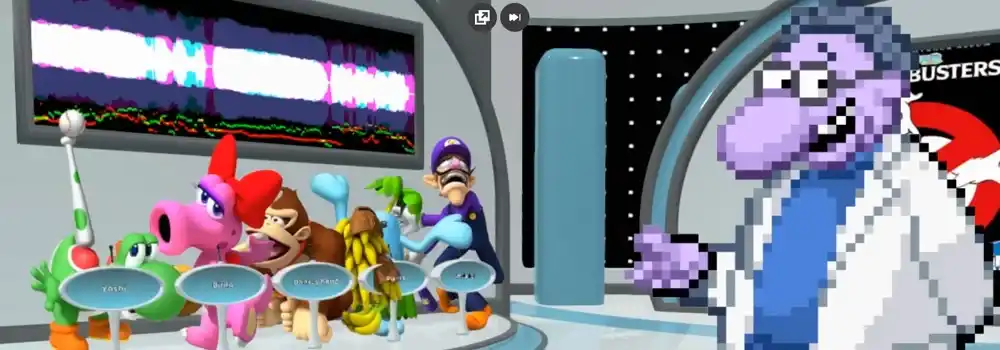
Take away every layer of customization and the loop underneath is short: a clip plays, you attempt it into your mic, and a panel weighs in on the result. Game Show Studio, the mode most people land on first, hands that judging job to a set of computer-controlled personalities reading your delivery. Accuracy of pitch is only part of what gets rewarded — timing and how committed a performance sounds both shift the outcome, which is why identical lines from two different people can land completely differently with the same panel.
Because the build is still early access, that judging behavior isn’t fixed from patch to patch, and it’s a frequent talking point in the community — some judge personalities are seen as fair, others as needlessly harsh on takes that felt solid to the player delivering them. Scoring inconsistency between sessions comes up often enough that the developer has acknowledged it as unfinished territory rather than something working as intended.
Two very different people can walk away with two very different impressions of this game: someone who treats pack-building as half the hobby will spend as long organizing content as performing, while someone else loads a single pack and just runs it at a party without opening the customization menu at all. Neither is wrong — they’re just experiencing different games under the same title.
This is where new players most often get caught off guard: skip the store page’s fine print and you’ll expect a stocked library, but what ships is closer to an empty frame waiting to be filled. Six slots can be swapped out — Voice, Menu, Judges, Studio, Host, and Contestant — and none of them are purely cosmetic; each one touches a different layer of what a session actually feels like.
None of this requires special tools — a folder and some audio files is enough to put a pack together, which is a big reason a modest pack-trading community has grown up around the title. Anyone chasing a very specific set of clips for a stream night is usually better off assembling one themselves than waiting for the built-in options to cover it.
Game Show Studio is where nearly everyone starts. It seats one to four people around the same machine, cycling turns in front of a fixed panel of computer judges — no chat integration, no outside connection, just whoever’s in the room.
Flip who’s judging and you get the streaming variant: a connected Twitch chat replaces the computer panel, casting votes on each attempt as it happens, which turns a quiet solo run into something closer to a broadcast with a crowd reacting live. It only makes sense with an audience actually watching — run it to an empty chat and the format loses its point.
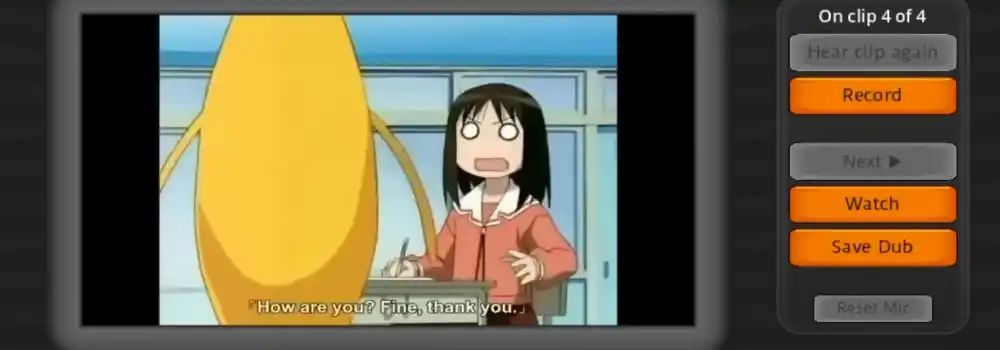
Dub Mode breaks from the scoring format entirely. Instead of chasing a judged number, the player lays a voiceover over a scene of their choosing, which plays more like open performance than competition. Anyone put off by being graded tends to end up here specifically because nothing is watching the clock or the panel.
Local multiplayer is the format behind most “I played this at a party” stories — up to four people trading turns on one setup, each attempt drawing its own reaction from the judges, with whatever pack got loaded that night deciding how unhinged things get.
There’s no keyboard scheme to memorize here — nearly everything runs through the mouse, which is exactly why it works as something to hand around a room.
With no controller support and nothing built for touchscreens, groups sharing a single setup end up trading the mouse hand to hand between turns — something worth planning around before a party rather than during one.
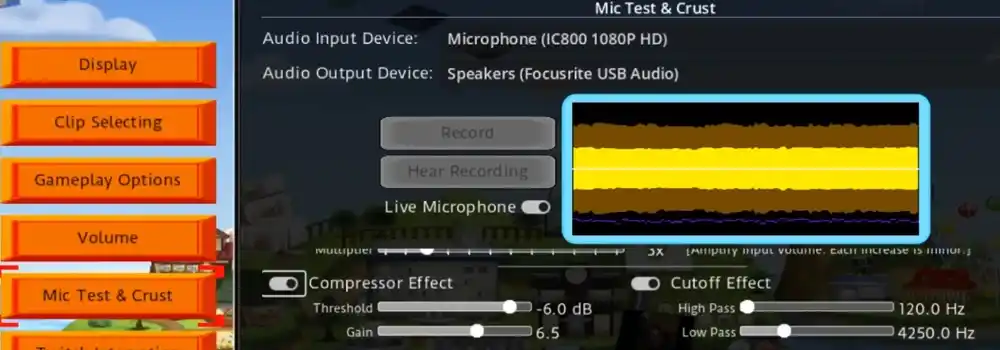
Skipping over this would be misleading, because it’s the topic that dominates community discussion more than any other: plenty of players find that sound simply never gets captured mid-session, which breaks the one mechanic the whole game depends on. It’s common enough that it has its own pinned threads from the developer, and the working theory points at surround-sound configurations running into a gap in how the underlying Godot engine handles audio capture.
A short check before purchase beats discovering the problem once you’ve already paid:
It’s also a fair snapshot of where the project stands overall: this is early access software, and while judged vocal performance is genuinely fun when the microphone behaves, going in expecting rough edges is more realistic than expecting a finished release.
Once someone moves past a first run-through with whatever pack happened to be loaded, a few habits start separating higher scores from lower ones across repeat sessions. Nailing the pitch alone doesn’t carry a round — the panel in Game Show Studio responds noticeably better when rhythm and phrasing echo the source clip too, not just the general tone of it.
Streamers tend to gravitate toward the chat-voting format specifically because a live audience rewards commitment and delivery over clinical accuracy — a genuinely different skill from what scores well against a computer panel. Players who’d rather perform without pressure altogether drift toward Dub Mode instead, where nothing is grading the attempt in the first place.
One thing only becomes obvious after handling more than one Voice pack: since packs are nothing more than folders of files, loading a different Judges pack changes how forgiving the reactions feel even when the performance underneath hasn’t changed at all — meaning a rough scoring streak can sometimes be fixed by swapping judges rather than grinding out more attempts.
Not currently. Everything multiplayer about The Choicer Voicer happens on one machine — up to four people trading turns locally — and the streaming variant only lets a Twitch audience weigh in through votes, not join as a direct competitor. There’s no mode that connects separate players from separate locations.
It’s a documented issue tied to how the Godot engine processes certain audio configurations, surround-sound setups especially. Running the no-gameplay demo first is the safest way to find out whether your particular hardware is one of the affected ones before any money changes hands.
Not right now — support is limited to Windows and Linux, and nothing for Apple’s operating system exists in the current build.
The Choicer Voicer still feels unfinished out of the box, and going in expecting a stocked library rather than an empty frame will only lead to disappointment until a few Voice packs get built or downloaded. But once Judges, Studio, and Host are set the way a group likes them, what’s left holds up as a legitimately funny way to burn an evening — whether that means four people passing a mouse around a couch or a streamer watching chat decide the fate of a Dub Mode take.